Imagine you are sitting at your desk on a Monday morning when your latest SAST scan flags thousands of findings. Your next release is due on Thursday, and suddenly, there is a lot to deal with. Developers believe most alerts are false positives, while your security team is struggling to verify them all before the deadline. With time running out, some findings get overlooked, and the same vulnerabilities may end up in production yet again.
This is where things start to go wrong. The tool may be doing its job, but managing the findings becomes a challenge. If you follow the right SAST best practices, you can turn scan results into actionable fixes and address vulnerabilities before they reach production.
Why SAST programmes don’t always work as expected
Before we get into SAST best practices, let’s look at what makes static code analysis difficult to manage in the first place.
Static Application Security Testing (SAST) examines your source code without running the application. It helps identify potential security weaknesses before the code reaches production. But here is where things get complicated. Scan reports pile up, developers receive findings when they are already busy with other tasks, and security teams struggle to decide which issues need attention first.
The consequences can go beyond delayed releases. A vulnerable codebase could expose confidential business information, leak sensitive data or give attackers a way into your customers’ systems.
The good news is that the problem does not always lie with the tool. Often, the way teams handle scan results needs attention. With the right process in place, you can make SAST more effective and ensure that important vulnerabilities do not get overlooked.
10 SAST best practices to secure code at every stage
The SAST best practices below answer each of those pain points in turn.
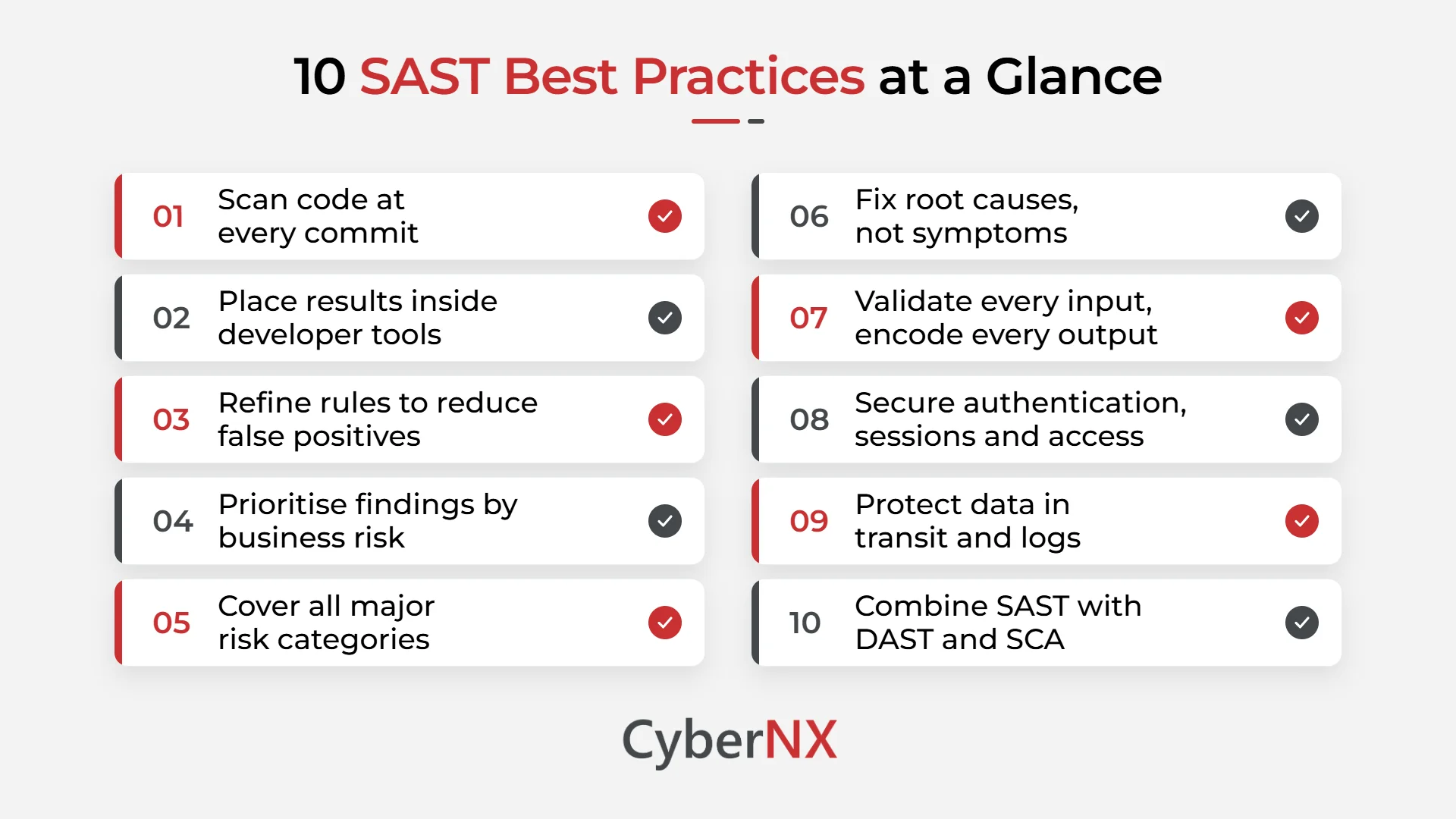
1. Scan at commit, not at release
Run scans whenever code is committed or a pull request opens. A flaw found on the same day is simple to correct. The same flaw found three weeks later needs fresh context, extra reviews and rework. Early scanning also removes the last-minute pressure before a release.
2. Place results where developers already work
Connect SAST to your IDE, source repositories and CI/CD pipeline. Findings inside a pull request receive attention. Findings inside a separate portal rarely do. Link each result to the exact line of code, so nobody has to hunt for the problem.
3. Refine rules to reduce false positives
Default rule sets often produce more alerts than any team can review. Begin with high-severity rules, then widen coverage as confidence grows. Adjust queries to match your frameworks and coding patterns. Revisit them each quarter, because your technology stack keeps changing.
4. Prioritise findings by business risk
Not every finding needs urgent action. Start with internet-facing code, payment flows and areas that handle sensitive data. Rank the rest by exploitability and likely impact. Agree this ranking with engineering leads in advance, so debates do not delay each release.
5. Cover the risk categories that matter
Your checklist should reflect how flaws appear in real code. Make sure your scans address these areas:
- Dataflow problems: input from untrusted sources must be validated and sanitised before use.
- Semantic errors: code needs analysis in context, for example when identifying SQL injection.
- Misconfigurations: application settings should match your internal security policies.
- Control flow issues: unsafe sequences, such as uninitialised variables, can open the door to cross-site scripting (XSS).
- Structural flaws: weak class design and hardcoded passwords often hide here.
- Memory problems: buffer overflows and risky functions such as strcpy and strcat need flagging.
6. Fix the root cause and share the lesson
Patching one line often leaves the wider pattern untouched. Trace where untrusted data enters your application and where it is finally used. A single correction at the source can resolve several findings together.
Then share what you learned. Discuss recurring patterns in code reviews and short team sessions. Findings from your own code teach far more than generic training, and the same mistake stops returning.
7. Validate every input and encode every output
The OWASP secure coding practices give your SAST rules a strong foundation. Check all input against an allowed list. This covers URLs, HTTP headers and embedded code, not only form fields.
Encode output so that unsafe data never executes as code. This one habit blocks a large share of XSS attacks. Configure your scanner to flag any path where input reaches output without these checks.
8. Strengthen authentication, sessions and access control
Weak identity handling is a common source of serious findings. Ask your scans to verify the following:
- Password complexity rules are enforced and reuse is blocked.
- Failed logins are reported to the user.
- Sessions end at logout, and inactivity timeouts stay short.
- Least privilege applies to databases, files and sensitive data.
9. Protect data in transit, in logs and in memory
Use Transport Layer Security (TLS) for external connections. Never allow a failed connection to fall back to an insecure protocol. Use secure random number generators and manage cryptographic keys with care.
Review logging too. Record useful events, but never store passwords or personal data in logs. Apply patches on time, hide version details in HTTP response headers and keep test environments away from production. For memory, check buffer sizes and truncate input before copy functions.
10. Combine SAST with DAST and SCA
SAST examines code, but it cannot observe runtime behaviour or open-source dependencies. Dynamic testing covers how the application behaves when it runs. Software composition analysis covers the libraries you did not write. Together, the three methods give you a fuller view of application risk.
Common mistakes that weaken your SAST practices
Even mature teams repeat these errors. Review your own process against each one.
- Using the scan only as a release gate: When scanning happens just before launch, every finding becomes a delay. Regular scans spread the effort across the sprint and keep releases on schedule.
- Switching on every rule at once: A flood of alerts on day one discourages developers and affects their trust in the tool. Begin small, then expand as your team gains confidence.
- Dismissing internal applications: Internal tools often hold privileged access and sensitive data. Attackers who gain a foothold elsewhere will look for exactly these weaker systems.
- Leaving suppressed findings unreviewed: An issue marked as a false positive last year may be real today, after code changes. Schedule periodic reviews with a named owner.
- Treating SAST as complete coverage: It reveals what is written in code, not how the application behaves in production. Without dynamic and dependency testing, blind spots remain.
Final thoughts
Strong application security does not happen overnight, and it rarely comes from a single project. It comes from the small steps your team takes throughout development, whether that means scanning code early, reviewing findings carefully, fixing the root causes or helping developers understand security risks.
By following the right SAST best practices, you can spend less time dealing with recurring vulnerabilities and more time building secure, reliable applications.
Of course, putting these practices into action is not always easy. At CyberNX, we provide cybersecurity services, including application security testing, Secure Code Review and DevSecOps guidance, to help organisations identify weaknesses and improve their security processes.
We can help you align SAST with your development workflow, reduce unnecessary alerts and focus on vulnerabilities that need attention. Get in touch with our team to strengthen your application security and make every release more secure.
SAST best practices FAQs
When should SAST be run in the development cycle?
As early as possible. Ideally, scans run on every commit or pull request, so developers receive feedback while the code is still fresh in their minds. This keeps fixes small and inexpensive. Running scans only before release often creates delays and rushed decisions.
How can we reduce false positives in SAST results?
The first step is to configure your SAST tool according to the languages and frameworks you use. When an alert turns out to be a false positive, document why it is not a real issue before suppressing it. Also, review your rules and suppressed findings as your code changes. This way, your team can spend less time checking unnecessary alerts and more time fixing genuine vulnerabilities.
Which vulnerabilities does SAST usually detect?
It commonly identifies SQL injection, cross-site scripting, hardcoded credentials, buffer overflows, insecure configurations and weak data handling. It also flags risky functions and unsafe data flows across files. Findings differ by language and framework, so check coverage against your own stack before you rely on it.
How do we encourage developers to use SAST?
Getting developers to use SAST regularly can be difficult, especially when they already have tight deadlines. Make the process easier by showing scan results directly in their IDE or pull requests, so they can review issues without switching tools. Explain what went wrong, where the vulnerability exists and how to fix it. Most importantly, avoid overwhelming them with unnecessary alerts. When developers receive useful feedback at the right time, they are more likely to take security findings seriously and fix them.