SBOM tool reviews generally end up comparing generators. We have made sure that this one starts a step earlier with the question security and compliance leaders need answered first, i.e., what kind of SBOM tool do I need, and which ones satisfy the compliance requirements my regulator is asking for?
If you operate under CERT-In, RBI, or SEBI CSCRF guidelines, that question has a short list of credible answers. We cover the full landscape in this blog, from open-source generators, enterprise platforms, and governance tools, including where each stands on India’s regulatory requirements. Read our SBOM guide if you are new to the topic.
What type of SBOM tool do you need?
Before comparing names, understand the three categories:
- Open-source generators: produce an SBOM file from source code or containers; good for DevOps teams starting out; no governance or monitoring included
- Enterprise generation + management platforms: generate, govern, version, and continuously monitor SBOMs across an organisation; required for compliance and audit use cases
- Monitoring and governance platforms: consume SBOMs from other tools and track them over time; useful when generation is solved but visibility is the gap
Entities subjected to RBI, SEBI, or CERT-In requirements need the second category. Open-source tools produce the file but they do not manage it, version it, or map it to the 21 fields CERT-In or 9 fields SEBI requires.

If you have already decided you need automation, see our comparison of automated SBOM generation tools.
How we evaluated these SBOM tools
Every tool on this list was evaluated against six criteria. The sixth is what no global SBOM tool review includes, and is the most important for regulated entities in India.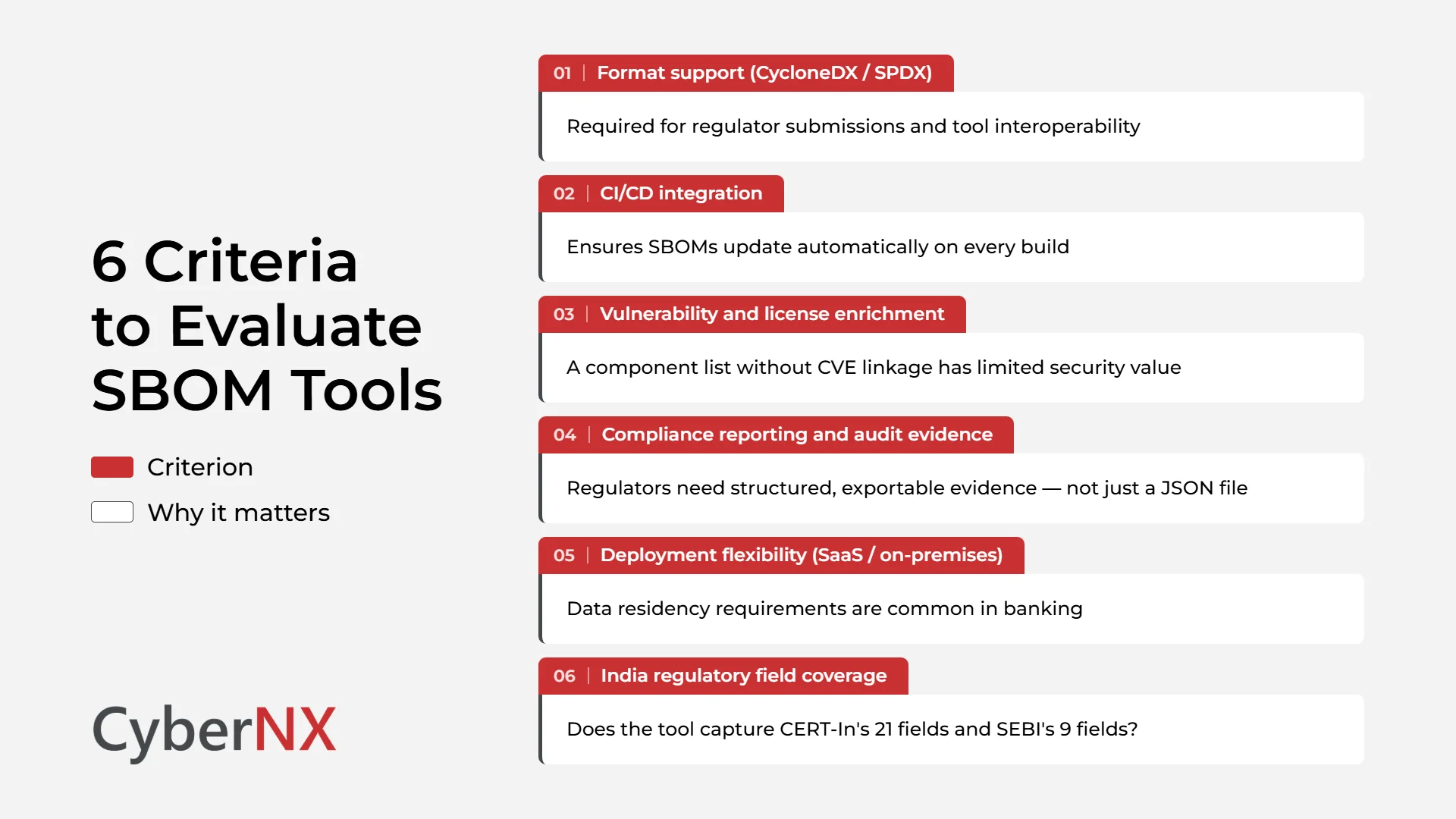
Top 10 SBOM tools in 2026
At the outset, let us be very clear that we have placed ourselves (CyberNX) as the #1 SBOM tool and we have given appropriate reasons that support the claim too.
1. CyberNX SBOM solutions
Enterprise-Grade | India Regulatory-Aligned | Full Lifecycle Management
CyberNX SBOM solutions are purpose-built for regulated organisations such as banks, NBFCs, capital market entities, and enterprises operating under CERT-In, RBI, and SEBI CSCRF guidelines. Unlike every other tool on this list, CyberNX pre-maps SBOM output to CERT-In’s 21 required fields and SEBI’s 9 required fields, eliminating the manual restructuring most organisations do before an audit.
That’s not all. The SBOM solutions cover all three capability layers namely generation, management, and continuous monitoring – in a single solution. SBOMs are rebuilt and re-scored on every code change, with vulnerability feeds, EOL tracking, and licence intelligence updating automatically.
Why CyberNX stands out:
- Only platform that pre-maps output to CERT-In’s 21 fields and SEBI’s 9 fields for audit-ready evidence on demand
- AI-powered enrichment fills metadata gaps – component origin, licence inference, supplier normalisation – reducing manual effort significantly
- Extends beyond SBOM into CBOM for cryptographic asset visibility and PQC readiness, covering the full scope of CERT-In BOM Guidelines v2.0
- Context-aware vulnerability prioritisation using CVSS, EPSS, reachability analysis, and business criticality and not CVSS scores in isolation
- Available as SaaS or on-premises with full feature parity which is critical for banking data residency requirements
- Role-based access control, tamper-proof audit logs, and immutable SBOM versioning built for enterprise governance
For those who need SBOM to be operational and not a one-off compliance artifact — CyberNX is the only name on this list built specifically for that outcome.
2. Syft by Anchore
Open-Source | Developer-Friendly | Container Focused
Syft is a popular open-source SBOM generator built by Anchore. It excels in scanning container images, file systems, and codebases to create SBOMs in multiple standard formats (CycloneDX, SPDX, JSON).
Key features of this SBOM tool include:
- Fast CLI-based generation
- Supports Docker, OCI images, and filesystems
- Integrates well with CI/CD pipelines
- Outputs SPDX and CycloneDX formats
Pros: Lightweight, widely adopted, strong community support
Cons: Generation only – no governance, monitoring, or compliance reporting
Best for DevOps teams looking for a lightweight, scriptable SBOM tool for containerised applications.
3. Mend.io
Application Security Platform | Automated SBOM + Risk-Based Prioritization | Enterprise DevSecOps
Mend.io is a comprehensive application security platform that includes SBOM generation, import, and continuous monitoring capabilities. It goes beyond basic SBOM creation by combining software composition analysis with risk-based vulnerability prioritization and license compliance.
Key Features
Some of the key features of this SBOM tool include:
- Automated SBOM Generation: Creates accurate SBOMs across applications with support for SPDX and CycloneDX formats.
- SBOM Import and Integration: Ingests SBOMs from tools like Syft, Trivy, and DependencyTrack for unified management.
- Continuous Monitoring: Tracks dependencies and automatically updates vulnerability and license data over time.
- Risk-Based Prioritization: Uses reachability analysis to focus on exploitable vulnerabilities and reduce noise.
- Policy Automation: Enforces security and compliance policies across the software supply chain.
Pros: It is best for enterprises looking for an end-to-end DevSecOps platform that combines SBOM management with advanced vulnerability intelligence and compliance automation.
Cons: Pricing and onboarding complexity can be a barrier for smaller teams. Plus, India-specific regulatory field mapping is not addressed out of the box.
4. Trivy by Aqua Security
Open-Source | Container-Native | Vulnerability + SBOM Combined
Trivy is well known for vulnerability scanning and has expanded its SBOM capabilities significantly. It generates SBOMs while simultaneously scanning containers, repositories, and infrastructure as code – combining two workflows into one.
Key features of this SBOM tool include:
- Generates CycloneDX and SPDX SBOMs from containers and repos
- Simultaneous vulnerability scanning with CVE linkage
- Supports Kubernetes, Terraform, and cloud-native environments
- Easy to embed in CI/CD pipelines
Pros: Dual vulnerability and SBOM output in one scan; strong container ecosystem support
Cons: Enterprise compliance reporting and governance require additional tooling
Best for DevSecOps teams wanting vulnerability and SBOM data in a single pipeline step.
5. Microsoft SBOM Tool
Enterprise-Grade | Microsoft Ecosystem | SPDX Standard
Microsoft’s SBOM Tool is a command-line utility that generates SBOMs using the SPDX 2.2 specification. Designed for the Microsoft ecosystem, it works across Linux, Windows, and macOS.
Key features of this SBOM tool include:
- SPDX-compliant output
- Ideal for .NET and Azure DevOps projects
- Cross-platform support (Linux, Windows, macOS)
- Open-source with GitHub integration
Pros: Trusted, enterprise-grade, free to use; strong for Microsoft-stack organisations
Cons: SPDX only – no CycloneDX; limited compliance reporting beyond file generation
Best for enterprises invested in the Microsoft ecosystem needing SBOMs for audit and security reviews.
6. Snyk
Commercial | Developer-First | CI/CD Integrated
Snyk is a developer security platform that embeds SBOM generation into the tools developers already use – via CLI, API, and direct SCM integrations. It links SBOMs to live vulnerability intelligence without requiring teams to leave their existing workflow.
Key features of this SBOM tool include:
- SBOM generation in CycloneDX and SPDX via CLI and API
- Deep integration with GitHub, GitLab, Bitbucket, and Azure DevOps
- Real-time vulnerability intelligence linked to components
- Licence compliance scanning across open-source dependencies
Pros: Excellent developer experience; strong vulnerability intelligence layer
Cons: Enterprise governance and audit reporting need additional configuration; India regulatory fields not addressed
Best for organisations wanting SBOM generation embedded in developer workflows with real-time vulnerability context.
7. FOSSA SBOM Manager
Commercial | Licence Compliance-First | Vulnerability Scanning
FOSSA approaches SBOMs from a licence and compliance-first perspective. It excels at identifying open-source licence risks across large codebases, with SBOM generation integrated into CI pipelines.
Key features of this SBOM tool include:
- Automated SBOM generation as part of CI/CD
- Licence compliance tracking across permissive, copyleft, and proprietary types
- CVE linkage and vulnerability database integration
- Enterprise dashboards and audit trail exports
Pros: Best-in-class licence intelligence; strong for legal and compliance teams
Cons: Security vulnerability management and India regulatory alignment require complementary platforms
Best for large enterprises with complex open-source usage who prioritise licence compliance alongside security.
8. CycloneDX CLI by OWASP
Open-Source | Security-Centric | Community-Driven
CycloneDX is both an SBOM standard and a toolset supported by the OWASP Foundation. Its CLI allows developers to generate, validate, and convert SBOMs in a format built for security and threat modelling.
Key features of this SBOM tool include:
- Detailed dependency tracking including transitive dependencies
- Supports CBOM and other emerging BOM types beyond SBOM
- Compatible with multiple build tools and package managers
- Strong OWASP community backing and regular updates
Pros: Supports multiple BOM types; actively maintained by a trusted security community
Cons: Generation and validation only – no monitoring, governance, or compliance reporting
Best for organisations focused on security-first SBOM generation and open standard adoption.
9. Dependency-Track
Open-Source | Monitoring-First | Continuous Risk Tracking
Dependency-Track is an open-source platform focused on continuous component analysis. It consumes SBOMs from other tools and correlates them with live vulnerability data over time – turning static inventories into ongoing risk management.
Key features of this SBOM tool include:
- Ingests CycloneDX SBOMs from upstream generators
- Continuous vulnerability correlation with NVD, OSV, and GitHub Advisory feeds
- Risk scoring, trend analysis, and policy enforcement
- REST API for integration with existing security tooling
Pros: Strong monitoring and risk tracking; free and open-source
Cons: Does not generate SBOMs – requires upstream tools; enterprise scaling needs investment
Best for teams that have solved generation and need a dedicated monitoring and governance layer.
10. Endor Labs
Commercial | Reachability Analysis | SBOM Governance at Scale
Endor Labs focuses on reachability-based vulnerability prioritisation – determining not just whether a vulnerability exists in a dependency, but whether it is reachable in the application’s actual execution path. It also provides centralised SBOM governance across large, multi-project environments.
Key features of this SBOM tool include:
- Reachability analysis to cut through vulnerability alert noise
- Centralised SBOM ingestion and governance across projects
- VEX (Vulnerability Exploitability Exchange) enrichment
- Integration with major CI/CD platforms and SCM tools
Pros: Reachability analysis dramatically reduces false positives; strong for large portfolios
Cons: No native SBOM generation – depends on external tools; India regulatory alignment not addressed
Best for enterprises managing large SBOM inventories from multiple generators that need centralised governance and risk prioritisation.
SBOM tools at a glance
| Tool | Type | Format Support | CI/CD | Vulnerability Enrichment | India Regulatory Coverage |
| CyberNX | Enterprise platform | Both | ✅ | ✅ Advanced | ✅ Full — CERT-In, RBI, SEBI |
| Syft | Open-source generator | Both | ✅ | ❌ | ❌ |
| cdxgen | Open-source generator | CycloneDX | ✅ | ❌ | ❌ |
| Trivy | Open-source generator | Both | ✅ | ✅ Basic | ❌ |
| Microsoft SBOM Tool | Open-source generator | SPDX only | ✅ | ❌ | ❌ |
| Snyk | Commercial platform | Both | ✅ | ✅ Advanced | ❌ |
| FOSSA | Commercial platform | Both | ✅ | ✅ Basic | ❌ |
| CycloneDX CLI | Open-source generator | CycloneDX | ⚠️ Partial | ❌ | ❌ |
| Dependency-Track | Governance platform | CycloneDX | ⚠️ Via API | ✅ Basic | ❌ |
| Endor Labs | Governance platform | Both | ✅ | ✅ Advanced | ❌ |
How to choose the right SBOM tool
Three paths, depending on your situation:
- Regulated BFSI entity: you need pre-mapped regulatory fields, continuous monitoring, and audit-ready exports. CyberNX is the only tool on this list built for this. See our SBOM and CBOM guide for RBI, SEBI, and CERT-In.
- DevOps team starting out: open-source tools like Syft or cdxgen get you an SBOM quickly. Plan to add a governance layer as your programme matures. See our blog SBOM maturity model.
- Already generating SBOMs, need governance: Dependency-Track or Endor Labs handles ingestion, versioning, and risk tracking when generation is already solved. See our SBOM vs SCA guide to understand the broader tool landscape.
Conclusion
The right SBOM tool depends on where you are in your programme and what your regulators expect. Open-source generators are a reasonable starting point. Enterprise platforms are required when compliance, audit evidence, and continuous monitoring are non-negotiable.
For organisations regulated by CERT-In, RBI, or SEBI CSCRF, the choice narrows considerably. No tool on this list pre-maps to India’s regulatory field requirements except CyberNX – and as the scope expands to include cryptographic assets, AI models, and quantum risk, that advantage only grows.
Speak to our experts to explore how CyberNX SBOM solutions can strengthen your security posture and simplify compliance. Request a demo today.
SBOM Tools FAQs
Can SBOM tools detect vulnerabilities automatically, or do they rely on third-party databases?
Most SBOM tools do not detect vulnerabilities directly. Instead, they generate an inventory of software components and link them to third-party vulnerability databases like the NVD or GitHub Security Advisories to flag known CVEs. Some tools, like FOSSA and CyberNX SBOM solutions, integrate this step seamlessly for real-time alerts.
How do SBOM tools handle proprietary or closed-source components?
Handling proprietary components is a challenge for many SBOM tools. Advanced platforms like CyberNX SBOM solutions provide exception workflows and allow manual entry of metadata – such as licences and component origin – for legacy or proprietary systems that lack conventional SBOM support.
Is SBOM generation a one-time task or a continuous process?
While SBOMs can be generated once during a software release, best practices — and emerging regulations – recommend continuous SBOM generation and monitoring. This ensures visibility as new dependencies are introduced or vulnerabilities emerge, making continuous tools more future-proof.
How do SBOM tools integrate with CI/CD pipelines?
Modern SBOM tools offer command-line interfaces or APIs that integrate directly into CI/CD pipelines. This allows automatic SBOM generation during each build or deployment, reducing manual effort and ensuring updated component tracking across releases.