CrowdStrike MDR Implementation is not just about installing an agent. It is about deploying a managed detection and response capability that works from day one. Many security teams struggle during rollout. Sensors get deployed, but policies are misaligned. Alerts trigger, but workflows are unclear.
With breakout times continuing to shrink, often under one hour, there is little margin for configuration errors. This step-by-step CrowdStrike MDR implementation guide is designed for security engineers, IT administrators and deployment teams. It walks you through what to do, in order, with clear actions. Think of this as your operational manual for getting it right.
Still weighing up CrowdStrike MDR for your organisation? We have covered its capabilities and benefits in detail here: CrowdStrike MDR: What’s Included and What’s Not.
If your decision is made and you are ready to implement, continue with the steps below.
Pre-deployment preparation
Before you begin CrowdStrike MDR implementation, you need clarity on scope and environment. Skipping this step creates rework later.
- Define deployment scope: List endpoints by OS type. Include Windows, Linux, macOS and cloud workloads. Identify remote users and VPN dependencies.
- Validate licensing and access: Ensure your Falcon console access is provisioned. Confirm your MDR entitlement under Falcon Complete.
- Review network requirements: Allow outbound HTTPS traffic to CrowdStrike cloud domains. No inbound firewall changes are required. Confirm proxy configurations if used.
- Align internal stakeholders: Define alert escalation paths. Confirm who owns containment approvals. Clarify change control windows.
Our experience shows that small alignment gaps during planning create large operational delays later. Now, let’s move on to the implementation steps.
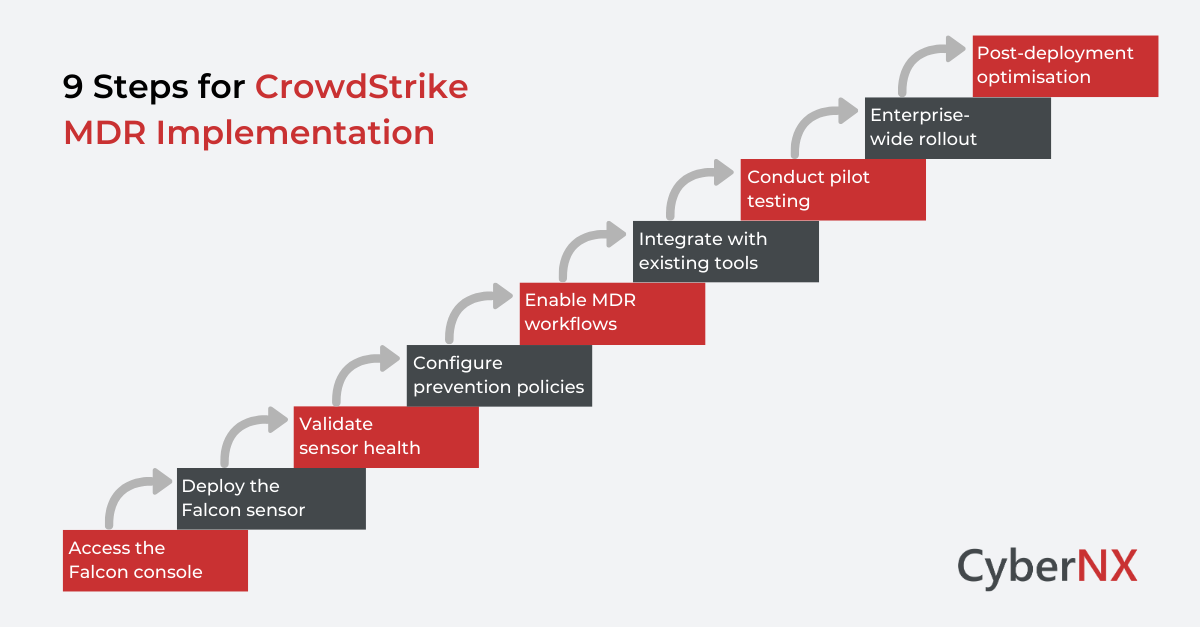
Step 1: Access the Falcon console
Log into your Falcon console provided under your MDR subscription.
Navigate to: Host Setup → Sensor Downloads
Here you will find:
- Customer ID
- Sensor installers for each OS
- Deployment documentation
Download the correct sensor package for your environment. This is the foundation of your CrowdStrike implementation.
Step 2: Deploy the Falcon sensor
Sensor deployment is the first technical milestone.
1. Windows deployment
Run the installer using administrative privileges.
Example command: WindowsSensor.exe /install /quiet /norestart CID=YOUR_CUSTOMER_ID
- You can deploy using:
- Group Policy
- Microsoft Intune
- SCCM
- PowerShell scripts
After installation, verify the host appears in the Falcon console under Hosts Management.
2. macOS deployment
Install using the provided package file. Approve system extensions when prompted. Without this approval, full protection will not activate. Verify host registration in the console.
3. Linux deployment
Use the package manager appropriate for your distribution.
Example:
sudo rpm -ivh falcon-sensor.rpm
sudo /opt/CrowdStrike/falconctl -s –cid=YOUR_CUSTOMER_ID
sudo systemctl start falcon-sensor
Confirm the sensor service is running.
Step 3: Validate sensor health
Once endpoints appear in the console:
- Confirm sensor status is healthy
- Check policy assignment
- Verify prevention mode is enabled
- Confirm cloud connectivity
Do not move forward until health metrics show stable reporting. This validation stage is often rushed and that leads to blind spots.
Step 4: Configure prevention policies
Now you move from installation to protection.
Navigate to:
Configuration → Prevention Policies
Create or customise policies based on environment sensitivity.
Recommended approach:
- Start in detect mode for pilot systems
- Monitor false positives
- Shift to prevention mode gradually
This phased approach reduces operational disruption.
Step 5: Enable MDR workflows
CrowdStrike MDR implementation is complete only when response processes are aligned.
Under Falcon Complete:
- Review containment settings
- Define automatic host isolation rules
- Confirm contact details for 24×7 escalation
- Establish ticketing integration if required
The goal is simple. When an incident occurs, response must be immediate and clear. Configuration discipline directly impacts that maturity.
Step 6: Integrate with existing security tools
Your CrowdStrike MDR implementation should not operate in isolation. Consider integrations with:
- SIEM platforms
- SOAR tools
- Identity providers
- ITSM platforms
Create API credentials under: Support → API Clients and Keys
Use least privilege principles and document integration flows. This ensures unified visibility across your security stack.
Step 7: Conduct pilot testing
Before full rollout:
- Select 5 to 10 percent of endpoints
- Simulate benign test alerts
- Validate notification workflows
- Confirm isolation procedures
Review logs and then measure response time. Only after validation should you scale deployment.
Step 8: Enterprise-wide rollout
Deploy sensors across remaining endpoints in controlled waves.
Track:
- Installation success rate
- Policy assignment accuracy
- Sensor connectivity
- Alert volume trends
Avoid deploying all systems simultaneously unless automation is mature. Phased expansion reduces operational risk.
Step 9: Post-deployment optimisation
CrowdStrike MDR Implementation does not end at installation.
Schedule:
- Weekly alert reviews
- Monthly policy tuning
- Quarterly threat posture assessment
- Executive reporting alignment
Work alongside CrowdStrike analysts to fine-tune detections. Security improves with iteration.
Read: CrowdStrike MDR Implementation Checklist for Enterprises
Possible implementation pitfalls
Even experienced teams make mistakes. Here are some possible implementation pitfalls noted:
- Ignoring network proxy rules
- Deploying directly in prevention mode
- Failing to align containment authority
- Skipping pilot validation
- Overlooking integration testing
Each of these can delay operational effectiveness but clear sequencing prevents them.
Measuring implementation success
Define measurable outcomes:
- Sensor coverage percentage
- Mean time to detect
- Mean time to contain
- Reduction in unmanaged endpoints
A successful CrowdStrike MDR Implementation delivers visibility, response speed and operational clarity. If these metrics are not improving, revisit configuration.
Conclusion
CrowdStrike MDR Implementation requires a structured approach. Start by installing the sensor and validating its health. Then configure policies, align response workflows and integrate with existing tools. Ongoing optimisation ensures the platform continues to deliver effective protection.
When done properly, it strengthens detection and reduces response time significantly. When rushed, it creates blind spots.
CyberNX is a CrowdStrike services partner and offers CrowdStrike consulting services. We support organisations through structured deployment, validation and optimisation of the Complete Falcon platform. Plus, we work alongside security teams to ensure your CrowdStrike MDR Implementation delivers measurable security outcomes.
If you are planning deployment or reviewing an existing setup, speak with our experts for a guided assessment and consultation.
CrowdStrike MDR implementation FAQs
How long does CrowdStrike MDR Implementation typically take?
For mid-sized enterprises, initial deployment may take one to two weeks depending on endpoint volume and change control processes. Larger environments require phased rollout planning.
Does CrowdStrike MDR require on-premise infrastructure?
No. The Falcon platform is cloud-native. Endpoints communicate outbound to CrowdStrike cloud infrastructure.
Can CrowdStrike MDR integrate with existing SIEM tools?
Yes. API-based integrations allow alert forwarding and telemetry sharing with most enterprise SIEM platforms.
What is the difference between Falcon Complete and Falcon Insight?
Falcon Insight provides endpoint detection and response capabilities. Falcon Complete includes managed detection and response delivered by CrowdStrike analysts.