Elastic Security conversations usually revolve around visibility, speed, and control. Not much is discussed about audits. However, they should be. After the initial deployment, many teams rarely pause to review whether the platform still works as intended. Data sources change, attack techniques evolve and teams could grow, then stretch thin. So, if you are already using Elastic, how long has it been that you reevaluated the setup – a quarter or more than year?
Our experience shows that an Elastic Security health check often reveals silent gaps. It could be alerts that fire too late, logs that never arrive or dashboards that no one trusts anymore. Auditing, then, is an important task to measure its effectiveness.
In this blog, we walk through a practical Elastic Security health check, using ten clear audit points. It is written for those who want confidence in their security stack. By the end, you will know what to test, why it matters, and how small adjustments can improve detection and response without ripping out your existing setup.
What is an Elastic Security health check?
Adopting Elastic Security is a good choice. But the catch here is that you should audit its effectiveness and see if it running as intended or as per the requirements. An Elastic Security health check helps in this regard. It is a structured review of how well your current Elastic deployment supports detection, investigation, and response. It goes beyond “is it running” and asks harder questions.
- Are you collecting the right data?
- Are alerts meaningful and timely?
- Can analysts investigate without friction?
When done well, the health check aligns Elastic Security with real operational needs and current threat realities.
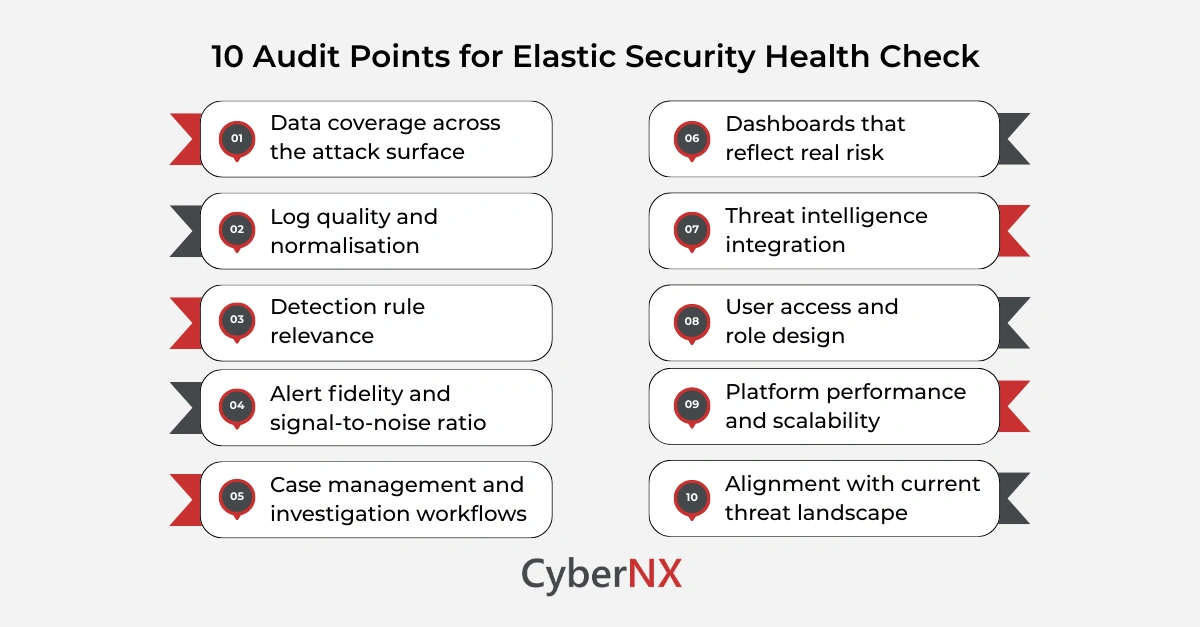
1. Data coverage across the attack surface/ Data coverage
Every effective detection starts with data. During an Elastic Security health check, begin by mapping what you collect against what you should collect.
Look closely at endpoints, identity systems, cloud workloads, network devices, and critical applications. Gaps often appear after mergers, cloud migrations, or tooling changes.
If a data source is missing or inconsistent, Elastic cannot detect what it cannot see. This is usually the single biggest risk we uncover during reviews.
2. Log quality and normalisation / Log quality
Having logs is not enough. They must be usable.
Check whether logs follow consistent formats and use Elastic Common Schema where possible. Poorly parsed logs slow investigations and weaken correlations.
During a health check, review:
- Fields frequently left empty
- Custom pipelines that break after upgrades
- Inconsistent timestamps across sources
Clean data reduces analyst fatigue and speeds up every investigation that follows.
3. Detection rule relevance/ Detection relevance
Elastic ships with a strong library of prebuilt rules. However, environments differ.
Audit which rules are enabled, which are disabled, and which have never fired. Then ask why. Rules that generate constant noise get ignored. Rules that never trigger may not fit your environment.
An effective Elastic Security health check tunes rules to your business reality, not generic threat models.
4. Alert fidelity and signal-to-noise ratio / Alert fidelity
Too many alerts erode trust. Too few create blind spots.
Review alert volumes by severity and data source. Look for spikes that correlate with routine activity, such as patching or backups.
We often recommend short tuning cycles rather than large rule overhauls. Small changes here can dramatically improve analyst focus and response time.
5. Case management and investigation workflows/ Investigation workflows
Detection only matters if teams can act.
Check how alerts move into cases. Are analysts adding context, notes, and evidence within Elastic? Or are they jumping between tools?
A healthy setup supports investigations end to end. Analysts should pivot from alert to timeline to entity view without friction. If that flow breaks, response slows when it matters most.
6. Dashboards that reflect real risk/ Risk dashboards
Dashboards shape decisions. Yet many become stale after initial deployment.
As part of your Elastic Security health check, review who uses each dashboard and why. Remove vanity metrics. Focus on exposure, active threats, and response performance.
Dashboards should help leaders answer simple questions quickly. What is happening? Where are we exposed? Are we improving?
7. Threat intelligence integration/ Intel integration
Elastic supports multiple threat intelligence feeds. However, many organisations enable them once and never review them again.
Audit which feeds are active, how often they update, and whether they contribute to detections. Outdated or irrelevant intelligence adds noise.
A focused set of high-quality feeds usually outperforms a long, unmanaged list.
8. User access and role design/ Access control
Security platforms often suffer from role sprawl.
Review user access rights during your health check. Ensure analysts, engineers, and administrators have appropriate permissions. Overprivileged accounts increase risk. Underprivileged ones slow response.
Clear role design also supports audit readiness and internal accountability.
9. Platform performance and scalability/ Platform scalability
Elastic’s strength lies in scale. Still, misconfigurations can degrade performance.
Check indexing rates, storage tiers, and retention policies. Look for slow queries or delayed ingestion during peak times.
Performance issues often surface quietly, then explode during incidents. A health check helps catch them early.
10. Alignment with current threat landscape/ Threat alignment
Threats change faster than tooling roadmaps.
Review whether your Elastic use cases reflect current attack techniques relevant to your industry. Cloud misuse, identity abuse, and living-off-the-land attacks deserve specific attention.
As Gartner noted in a recent SOC operations report, organisations that regularly review detection coverage reduce mean time to detect by up to 40 percent. The source is Gartner SOC Visibility and Response, 2024.
This final step turns a technical review into a strategic one.
Conclusion
An Elastic Security health check is not a one-off task. It is a discipline.
By auditing data, detections, workflows, and alignment with threats, you regain confidence in your security operations. More importantly, you make Elastic work for your team, not the other way around.
If you want a second set of eyes or a structured review led by practitioners, we can help. We work alongside your team to strengthen your defences and extract real value from Elastic. Talk to our experts for Elastic Stack Consulting. We will guide you about Elastic Security health check and see where small changes can make a big difference.
Elastic Security health check FAQs
How often should an Elastic Security health check be performed?
Most organisations benefit from a formal review every six to twelve months, or after major infrastructure changes.
Can a health check be done without disrupting operations?
Yes. A well-planned health check focuses on configuration review and analysis, not invasive changes.
Is an Elastic Security health check relevant for small SOC teams?
Absolutely. Smaller teams often gain the most value by reducing noise and simplifying workflows.
Does a health check replace penetration testing or red teaming?
No. It complements them by ensuring detections and response processes work when attacks occur.