Too many logs often lead to too little clarity. Many SIEM platforms promise visibility, yet most teams drown in noise while real threats slip past. This is where CrowdStrike NG-SIEM log ingestion changes the conversation. Built on a cloud-native architecture, it aims to simplify how organisations collect, process, and analyse security telemetry at scale.
However, technology alone is not enough. The value of a next generation SIEM depends on what you ingest and how you manage it. In this blog, we explore supported sources and practical best practices to help CISOs and security teams maximise visibility without inflating costs or complexity.
Understanding CrowdStrike NG-SIEM log ingestion
Before exploring sources, it helps to frame the bigger picture. Log ingestion is not simply about collecting data. It focuses on collecting the right data in the right format at the right time.
A modern SIEM must unify endpoint, cloud, identity, network, and application telemetry. When done correctly, ingestion fuels detection engineering, threat hunting, compliance reporting, and incident response.
With CrowdStrike’s cloud-native SIEM capabilities, ingestion is designed to scale elastically. And that matters. Enterprises generate terabytes of telemetry daily. Traditional SIEMs struggle under this load. A cloud-first model reduces infrastructure strain and improves performance.
Yet, clarity comes from structure. Let us examine supported sources.
Supported log sources in CrowdStrike NG-SIEM
A robust SIEM must integrate across the entire attack surface. CrowdStrike’s architecture supports diverse ingestion pipelines to unify telemetry.
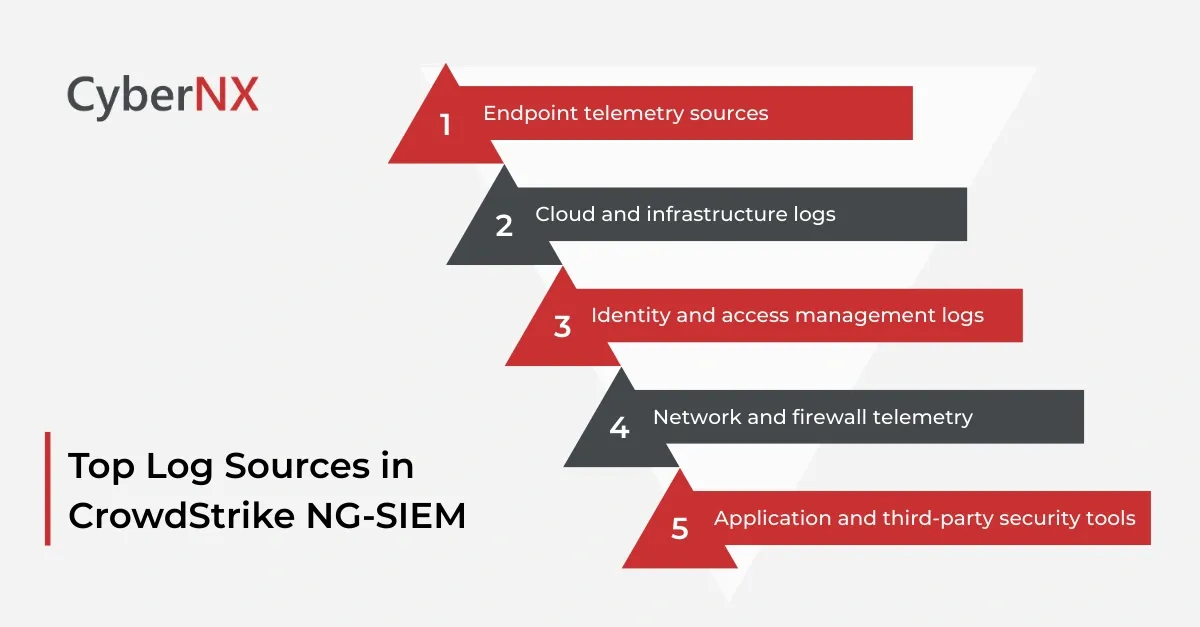
1. Endpoint telemetry sources
Endpoints remain a primary attack vector. Therefore, endpoint visibility is foundational.
Supported sources typically include:
- Native telemetry from CrowdStrike Falcon sensors
- Windows Event Logs
- Linux and macOS system logs
- Endpoint Detection and Response outputs
- Application-level logs from servers and workstations
Endpoint logs provide process execution data, user activity, file changes, and registry modifications. When enriched with threat intelligence, they deliver high fidelity detection.
Security teams often underestimate the value of clean endpoint data. In our experience, fine tuning endpoint ingestion reduces alert fatigue significantly.
2. Cloud and infrastructure logs
Cloud estates grow rapidly. Visibility often lags behind.
Supported sources generally include:
- AWS CloudTrail and CloudWatch logs
- Microsoft Azure activity logs
- Google Cloud audit logs
- Kubernetes audit logs
- Container runtime logs
These logs reveal API calls, privilege changes, misconfigurations, and suspicious automation behaviour.
Cloud telemetry must be normalised carefully. Each provider structures logs differently. A consistent schema improves detection logic and speeds investigations.
3. Identity and access management logs
Identity is now the new perimeter. Attackers target credentials before infrastructure.
Common supported identity sources include:
- Microsoft Entra ID logs
- Active Directory security events
- Okta authentication logs
- Single Sign On audit trails
- Privileged Access Management activity
Identity logs expose brute force attempts, impossible travel events, MFA bypass patterns, and privilege escalations. Strong ingestion policies here can uncover threats long before malware appears.
4. Network and firewall telemetry
Network data provides context. It answers the “where” and “how” behind suspicious behaviour.
Supported network sources may include:
- Firewall logs
- Intrusion Detection and Prevention Systems
- Secure web gateways
- VPN access logs
- Proxy logs
When correlated with endpoint and identity telemetry, network logs expose lateral movement and data exfiltration attempts.
The key is balance. Network logs can be high volume. Filtering unnecessary verbosity helps maintain efficiency.
5. Application and third-party security tools
Modern environments rely on diverse SaaS and security solutions.
Typical supported integrations include:
- SaaS audit logs
- Data Loss Prevention alerts
- Email security logs
- Vulnerability management platforms
- Threat intelligence feeds
Integrating third-party security tools enhances detection context. It also reduces blind spots across the ecosystem.
Best practices for effective log ingestion
Simply enabling ingestion is not enough. Smart configuration makes the difference between clarity and chaos.
Below are proven best practices we recommend to enterprise clients.
1. Define ingestion objectives before onboarding sources
Start with clear detection goals.
Ask critical questions:
- What threats concern us most?
- Which compliance requirements apply?
- Where do we lack visibility today?
Align ingestion with these priorities. Otherwise, costs grow without improving outcomes.
2. Normalise and enrich data early
Data consistency accelerates investigations.
Ensure logs are parsed into structured formats. Apply enrichment with threat intelligence, geolocation, and asset context at ingestion stage where possible.
This improves correlation accuracy and reduces manual effort during incident response.
3. Filter noise without losing context
Over collection increases storage costs and alert fatigue.
Focus on high value events such as authentication failures, privilege changes, process anomalies, and configuration modifications.
For example, ingesting every successful login may not add value unless risk signals exist. Instead, prioritise anomalies.
Precision matters more than volume.
4. Implement tiered retention policies
Not all logs require equal retention.
Hot storage supports active investigations. Warm and cold storage address compliance or historical analysis needs.
Tiered retention reduces operational expenses while preserving forensic depth.
5. Continuously review ingestion performance
Threat landscapes evolve. So should ingestion strategies.
Conduct quarterly reviews of:
- Log coverage gaps
- False positive rates
- Storage consumption
- Detection performance metrics
Small adjustments often yield substantial improvements.
Why strategic log ingestion strengthens security posture
When executed correctly, log ingestion becomes a competitive advantage.
- It supports faster detection
- It improves compliance reporting
- It enhances executive visibility
More importantly, it empowers proactive defence.
Security leaders often feel overwhelmed by data sprawl. We understand that pressure. Boards demand answers. Regulators expect transparency. Meanwhile, attackers move quickly.
Our approach focuses on practical alignment. We help teams define ingestion priorities, optimise configurations, and maintain clarity at scale.
Conclusion
CrowdStrike NG-SIEM Log Ingestion provides the technical foundation for unified visibility across endpoint, cloud, identity, and network environments. Yet its success depends on strategy. Supported sources must align with threat priorities. Data must be structured, enriched, and governed.
When security teams apply disciplined ingestion practices, they reduce noise, control costs, and strengthen detection accuracy.
If your organisation seeks to optimise SIEM performance or reassess telemetry strategy, we can help. Our expert team with rich experience work alongside your security and IT teams to design scalable ingestion frameworks that deliver clarity without complexity. Connect with us for a CrowdStrike Consultation and let us help you turn logs into actionable intelligence.
CrowdStrike NG-SIEM log ingestion FAQs
1. How does cloud-native SIEM ingestion differ from traditional SIEM ingestion?
Cloud-native ingestion scales elastically and reduces infrastructure overhead. Traditional SIEM platforms often require on-premise hardware management and manual scaling.
2. How can organisations estimate log ingestion costs accurately?
They should analyse daily event volume per source, apply filtering policies, and model retention requirements. Continuous monitoring ensures costs remain predictable.
3. What metrics indicate effective log ingestion performance?
Key metrics include detection coverage, mean time to detect, false positive rates, and storage utilisation efficiency.
4. Should organisations ingest logs from all SaaS applications?
Not necessarily. Focus on high-risk SaaS platforms that store sensitive data or provide administrative access.